
The idea of a refrigerator that connects to the internet may sound futuristic, but smart fridges have become common in many homes. They promise features like grocery tracking, internal cameras, and even entertainment. But a big question for many buyers is: Do smart fridges need WiFi to work? Let’s explore how these appliances function, what WiFi actually adds, and whether you can use a smart fridge without an internet connection.
What Makes A Fridge “smart”?
A smart fridge is more than a regular refrigerator with a screen. It connects to the internet and uses apps to provide extra features. Common functions include:
- Touchscreen controls for temperature and settings
- Internal cameras to view food from your phone
- Inventory tracking to manage groceries
- Voice assistants like Alexa or Google Assistant
- Remote diagnostics for maintenance
Not all smart fridges have every feature, but most require some connection to the outside world to reach their full potential.
Can A Smart Fridge Work Without Wifi?
The short answer is yes—basic fridge functions like cooling and freezing work without WiFi. The fridge keeps your food cold, the freezer keeps things frozen, and ice makers generally still function.
However, losing WiFi means you lose many smart features. Here’s a comparison to show what works with and without an internet connection:
| Feature | Works Without WiFi? | Requires WiFi? |
|---|---|---|
| Cooling/Freezing | Yes | No |
| Touchscreen Controls | Yes (basic) | No |
| Internal Cameras (remote view) | No | Yes |
| Grocery List Sync | No | Yes |
| Voice Assistant | No | Yes |
| Remote Troubleshooting | No | Yes |
So, while the fridge still functions as a fridge, you lose the remote access and smart features without WiFi.
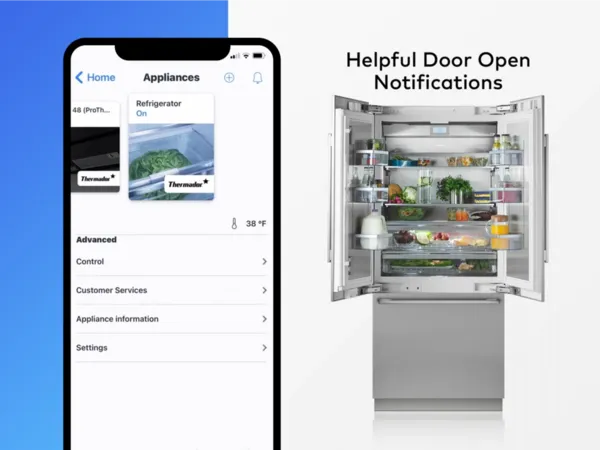
Credit: www.thermador.com
Which Smart Fridge Features Depend On Wifi?
Let’s look at some key features that need WiFi to work:
1. Remote Monitoring
Many smart fridges let you check inside using your phone. This helps when you’re at the store and can’t remember if you need milk. This feature only works if the fridge is online.
2. Automatic Updates
Manufacturers often update software to add features or fix bugs. Without WiFi, your fridge may miss out on important updates.
3. Smart Home Integration
Connecting your fridge to Alexa, Google Assistant, or smart home hubs relies on WiFi. No internet means no voice commands or smart routines.
4. Energy And Usage Reports
Some fridges track power use or notify you if the door is left open. Sending this information to your phone or email requires a connection.
5. Shopping And Recipe Apps
Ordering groceries or displaying recipes on the fridge’s screen needs an internet connection. Offline, these apps are either limited or don’t work at all.
What Happens If Wifi Is Unstable Or Lost?
If your WiFi cuts out, your fridge does not stop cooling. But smart features may behave differently:
- Some apps will show error messages or stop updating.
- You may not be able to see fridge cameras from your phone.
- Voice assistants become unavailable.
- Features return automatically when WiFi is restored.
A common beginner mistake is thinking a smart fridge will not work at all without WiFi. In reality, only the extra features are affected.

Credit: justenergy.com
Do All Smart Fridges Need Wifi?
Not every smart fridge is the same. Some features work offline, while others demand a constant connection. Here’s a quick look at three popular smart fridge brands and their WiFi reliance:
| Brand | Offline Functions | Needs WiFi For |
|---|---|---|
| Samsung Family Hub | Cooling, basic controls | Remote view, apps, updates |
| LG InstaView ThinQ | Cooling, knock-to-view | App control, Alexa |
| GE Profile | Cooling, water/ice | App alerts, diagnostics |
Some fridges, especially entry-level models, offer only a few basic smart features and may not need WiFi for daily use. Others, like the Samsung Family Hub, rely heavily on internet connectivity.
Are There Any Risks To Connecting Your Fridge To Wifi?
Connecting any device to the internet brings some risks:
- Privacy: Smart fridges may collect data on usage or inventory.
- Security: Any internet-connected device can be a target for hackers.
- Updates: If your fridge cannot update, it may be less secure over time.
To reduce risk, keep your fridge’s software up to date and use a strong WiFi password. Some experts recommend placing smart appliances on a separate network if possible.

Credit: www.samsung.com
Smart Fridge Without Wifi: Who Should Consider It?
If you want a fridge that just keeps your food cold, a smart fridge will still work fine without WiFi. But if you love the idea of remote control, food tracking, or recipes on the door, WiFi is essential.
A few practical tips if you plan to use a smart fridge offline:
- Set up the fridge while connected to WiFi to get initial updates.
- Turn off unnecessary features to save energy.
- Check the manual for features that work offline.
Many people overestimate how much the smart features will change daily life. Often, the basics are enough, and the extra features become “nice to have” rather than “must have. ”
Real-life Example
A user bought a Samsung Family Hub fridge but never connected it to WiFi. They could still adjust temperature, make ice, and use the touchscreen for notes. But when they tried to use the shopping list or camera features, the fridge asked for an internet connection. The main function—keeping food fresh—was never affected.
Frequently Asked Questions
Do I Need Wifi To Use A Smart Fridge’s Basic Cooling And Freezing?
No. The main function of keeping food cold or frozen works without WiFi. Only smart features require internet.
What Smart Features Will Not Work Without An Internet Connection?
You lose access to remote monitoring, app control, voice assistants, software updates, and any feature that requires syncing with your phone.
Can I Connect My Smart Fridge To Wifi Later If I Skip It During Setup?
Yes. Most smart fridges allow you to connect to WiFi at any time through the settings menu. You can also disconnect or change networks if needed.
Is It Safe To Connect A Fridge To Wifi?
Generally, yes, but use a strong password and keep the fridge’s firmware updated. For more about smart appliance security, see this Consumer Reports guide.
Will My Fridge Still Get Manufacturer Updates Without Wifi?
No. Updates require an internet connection. If your fridge is not connected, it may miss important software changes and new features.
Smart fridges offer a lot, but WiFi is only essential for their “smart” side. For most people, the peace of mind comes from knowing your food will stay cold, WiFi or not. If you value the extra features, keeping your fridge online is the way to go.
If not, you can safely unplug from the internet and enjoy the basics.